From Concept to Dynamo: The Trial-and-Error Behind a Generative Design Workflow
A long-form project note about translating a pathfinding concept into a Dynamo and Generative Design workflow, including CAD geometry, Revit Generic Model caching, Data.Remember, scalar GD outputs, and the failures that shaped the final structure.
From Concept to Dynamo: The Trial-and-Error Behind a Generative Design Workflow
Building the concept is one task. Moving it into a real .dyn workflow is another.
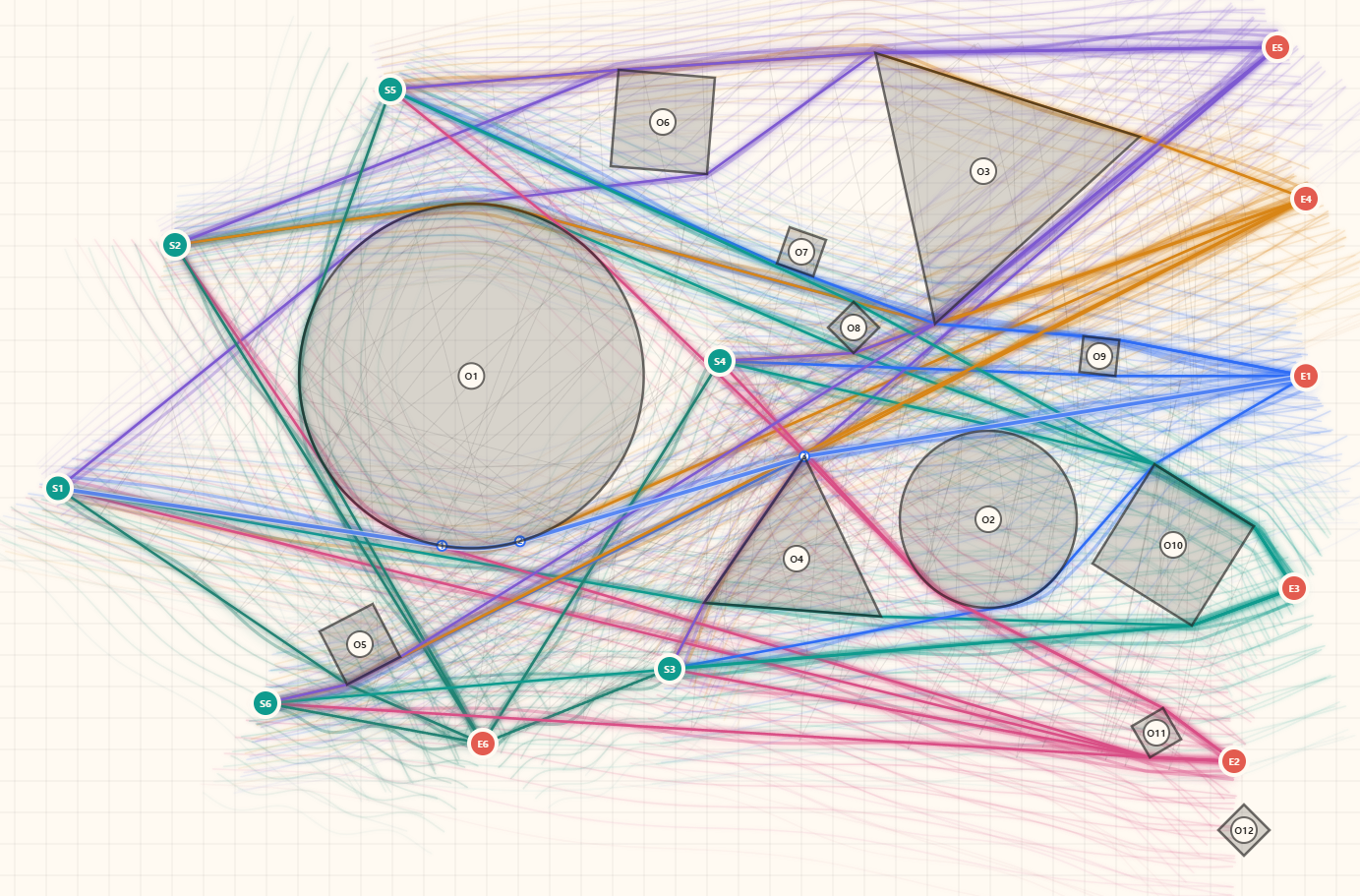
A few days ago I published Automation Lab: Runnable Pathfinding Experiment. That post introduced a small browser-based experiment: place start points, end points, and obstacles on a canvas, then generate route options around blocked areas.
On the web, the idea is easy to understand. A point is a point. An obstacle is a drawn shape. A route is a line. The coordinate system is controlled, the geometry types are clean, and every object is created by the application itself.
That makes the browser experiment useful as a concept layer. It can show the intent quickly: generate a route, avoid obstacles, compare alternatives, and visualize the decision.
But moving that same idea into Dynamo and Generative Design is a very different kind of work.
In a real project, an obstacle is rarely a clean rectangle or circle. It may be a CAD hatch inside an ImportInstance. It may be a Revit face, mesh, curve, polyline, DirectShape, Dynamo surface, stale Data.Remember value, or a cached Generic Model element created by a previous run. A route is not just a line on a canvas either. It has to survive inside a Dynamo graph, connect to a scoring engine, expose scalar outputs to Generative Design, and remain traceable enough for debugging.
This article is a record of that translation process.
It is not a clean success story. It is closer to a working note about failure. The workflow went through CAD extraction, Revit Generic Model caching, Data.Remember mistakes, surface and solid conversion attempts, broken union geometry, start and end point detection problems, unit conversion issues, and GD output wiring checks.
The important lesson was not that one perfect graph solved everything. The important lesson was that a practical Generative Design workflow needs a structure that can fail visibly.
1. The Starting Concept: A Route Should Avoid Obstacles
The first concept was simple.
We want a route or alignment to move from a start point to an end point. It should avoid obstacles. It should remain reasonably short. In some cases, it should follow or reward proximity to a preferred road guide. In other cases, it should avoid building-like regions or restricted areas.
In a browser prototype, that can be expressed in a straightforward way:
- define start and end nodes
- define obstacle geometry
- generate candidate routes
- measure whether routes cross obstacles
- compare alternatives visually
This is a good way to explain the idea. It is fast, visual, and disposable. If the concept is wrong, the experiment can be changed without touching a Revit model.
That is why the Automation Lab version matters. It is a safe place to shape the concept before it becomes a project workflow.
But the moment the concept enters Dynamo, the question changes. It is no longer only "Can a path avoid obstacles?" The new question is "What exactly is an obstacle in this project data, and can the graph prove that the evaluator is actually reading it?"
That second question is much harder.
2. The First Dynamo Layer: Making PI Variables Understandable to GD
Before connecting real CAD or Revit geometry, the alignment variable model had to be stable.
The route was controlled through PI points. A naive version might create a set of points and then sort them by station or X coordinate. That can work visually, but it is dangerous for Generative Design. If the meaning of each input slider changes after sorting, GD is not optimizing a stable design variable anymore.
So the PI model was organized around fixed slots.
Active PI Count
PI01 Local U / PI01 Local V
PI02 Local U / PI02 Local V
...
PI10 Local U / PI10 Local V
Design Area Width
Design Speed
Max Superelevation
The idea is that each PI keeps its identity. The baseline design area is divided into zones based on Active PI Count. PI01 belongs to zone 1, PI02 belongs to zone 2, and so on. Local U moves the PI along its zone. Local V moves it across the design width.
This matters because GD only sees input variables and output values. If a slider changes meaning from one option to another, the optimizer gets noisy feedback. If the slider has a fixed role, the design space becomes much easier to compare.
The output side needed the same discipline.
Dynamo development wants rich information. I want control points, segment tables, violation tables, debug text, metrics dictionaries, and preview geometry. Generative Design does not need all of that. It needs clear scalar values.
So the output contract became separate from the debug contract:
GD OUT Score
GD OUT Length
GD OUT Obstacle Hits
GD OUT Used PI Count
The Python node can still return a long list with diagnostics. But the values exposed to GD must be selected and reduced to one number per objective or constraint. That separation became one of the main rules of the workflow.
3. The CAD Connection Looked Simple, Until It Was Not
The next step was to connect actual CAD or Revit geometry.
At first, the plan looked reasonable:
Select CAD ImportInstance
extract hatch / surface / mesh / curve
send obstacle geometry to the evaluator
calculate route score
But a Dynamo graph can be visually convincing while still not being logically connected.
One version had a CAD extraction chain on the side of the graph. It selected an ImportInstance, read internal geometry, produced geometry and diagnostics, and even connected to Watch nodes. But the result was not actually wired into the main evaluator in the way the scoring engine needed.
That is an easy mistake to make in Dynamo.
A node exists, so it feels integrated. A Watch node shows something, so it feels alive. A file name says "CAD added", so it feels like the evaluator now uses CAD. But unless the evaluator input contract is checked, the scoring engine may still be reading an empty obstacle list.
This became the first practical lesson:
A node on the canvas is not the same thing as a workflow contract.
The graph must answer very specific questions:
- Which input is road guide geometry?
- Which input is obstacle geometry?
- Which input is start point?
- Which input is end point?
- Is this geometry current, or is it old cache?
- Is GD reading this value, or is it only visible in a Watch node?
Until those questions are answered, the algorithm is not trustworthy.
4. Why Data.Remember Became Both Useful and Dangerous
Heavy geometry makes Dynamo slow. Reading CAD, converting geometry, and passing large lists through a graph can become painful. Data.Remember is helpful because it allows a graph to preserve a heavy result and avoid reading the source again on every run.
But cache can also lie.
At one point, the reader logic had been changed, but the graph still showed a list of surfaces. It looked like the new code was not working. The user saw the same problem: the output still looked like individual surface lists, even though the intention was to move toward a cleaner geometry pipeline.
The real cause was not the current code.
The real cause was stale geometry stored inside Data.Remember.
One graph had grown to more than 30 MB because old SAB geometry was embedded in the file. The graph was carrying an old surface memory forward. As long as that remembered value remained, the Watch output could show previous geometry even after the Python code had changed.
That is a subtle but important failure mode. In an automation workflow, the visible output may not be the current output.
The practical rule became:
When testing a new geometry strategy, clear the Remember cache.
When a .dyn file becomes unexpectedly large, suspect embedded geometry.
When Watch shows old behavior, confirm whether the source is current code or stored memory.
This is not glamorous, but it is real project work. Much of automation is not about writing clever code. It is about knowing when the graph is showing the present and when it is showing a stored past.
5. The Solid Attempt: A Good Idea That Broke in Practice
After the surface cache problem, one direction seemed attractive: preserve solids.
The logic was understandable. If surface lists are heavy and messy, maybe the workflow should convert CAD faces, meshes, and closed polylines into thin solid proxies. Then the graph could store Generic Model DirectShapes, read them back as solids, and use solids for collision or overlap scoring.
In theory, that sounds cleaner.
In practice, it broke.
CAD geometry is not always clean boundary representation geometry. Imported hatches, triangulated faces, and fragmented meshes do not automatically become stable Revit solids. When many thin proxy solids are created from noisy CAD, small coordinate and tolerance problems appear. Some objects are broken. Some fall back to surfaces. Some are too fragmented to union safely.
Solid.ByUnion became a particular problem.
The original reason for using union was reasonable: reduce many obstacle pieces into fewer merged targets. But the union result was not just a preview. It entered the actual GD scoring route. That meant a broken or unstable union was no longer a visualization problem. It became an optimization problem.
The scoring engine was being asked to evaluate geometry that had already been damaged by the attempt to simplify it.
That changed the direction of the work.
The goal should not be "force everything into solids." The goal should be "make the evaluator see enough reliable geometry to score consistently."
That is a different engineering decision.
6. The More Stable Direction: Generic Model Cache and Surface-Fast Scoring
The workflow eventually moved toward a staged structure:
Stage 01 - Source geometry to Revit Generic Model cache
Stage 02 - Generic Model cache reader and diagnostics
Stage 03 - GD evaluator and scalar outputs
This separation was more important than any single algorithmic improvement.
Stage 01 reads the source CAD or Revit geometry and creates Revit Generic Model DirectShapes with role metadata. The roles are simple:
ROAD_GUIDE
OBSTACLE
START_POINT
END_POINT
Stage 02 reads the Generic Model cache back from Revit. This stage is not only a reader. It is also a diagnostic checkpoint. It tells us whether the model contains the expected roles, layers, source keys, and element counts.
Stage 03 is the GD evaluator. It no longer depends directly on selecting CAD ImportInstances. It reads the organized cache and then evaluates route options.
The stable version also removed Solid.ByUnion from the scoring path. Instead of trying to merge all obstacles into one solid, the scoring code can keep surface-like geometry and reduce the amount of work with a bounding box prefilter.
That was the key shift.
Rather than forcing geometry into a more ideal type, the workflow accepts the geometry that is likely to survive and makes the evaluation smarter around it.
This is why I call it a surface-fast approach:
- preserve practical surface and curve-based geometry when that is more stable
- avoid fragile solid proxy conversion when it damages the model
- do not union noisy CAD-derived geometry unless there is a proven reason
- use spatial filtering before expensive overlap checks
- keep diagnostics visible at each stage
It is less elegant than a single clean solid model. It is also more realistic.
7. Start and End Points Were Their Own Problem
The start and end points also required careful handling.
In a browser experiment, a start point is just a point. In a real CAD-to-Dynamo workflow, a start point might be represented by a circle, a short line, a polyline, a layer name, or a symbol. When that geometry becomes a Generic Model DirectShape, it may not remain a readable circle.
So the workflow needed start/end point resolution:
read layer names
detect start and end markers
extract circle or polyline centers
fall back to bounding box centers when needed
report diagnostics
This might sound like a small detail, but it is not.
If the evaluator reads the wrong start point, every route option is wrong. If the evaluator reads no start point, the graph may still run but the output becomes meaningless. If the start and end values are hidden inside a stale cache, it becomes even harder to understand what happened.
This is another example of the same principle: a GD graph needs more than geometry. It needs contracts and diagnostics.
8. Units and Scale Created Another Layer of Failure
The browser experiment lives in one coordinate system. Revit and Dynamo do not feel that simple.
Revit has internal units. Dynamo previews may feel like model units. The engineering logic may be described in meters. CAD source geometry can arrive in another scale. Generative Design only sees the numeric result of the graph.
That means length score, road overlap, obstacle tolerance, design width, and PI location all have to agree about units.
Several versions of the workflow existed because of this issue:
- model coordinate versions
- meter-scaled score versions
- Revit-feet-aware versions
- start/end passthrough versions
- width frame debug versions
This is exactly the kind of issue that is easy to understate in a polished article. But in practice, unit alignment is one of the main reasons a graph can look correct and still score incorrectly.
If the route preview looks visually close but the score is wrong, the error may not be pathfinding. It may be scale.
9. GD Outputs Must Stay Narrow
Throughout the process, the GD output contract had to be checked repeatedly.
During development, it is tempting to expose everything:
- preview geometry
- diagnostics
- violation tables
- road overlap rows
- obstacle rows
- point records
- debug messages
These are useful for the human developer. But they are not all useful for Generative Design.
The GD study needs a small number of stable outputs:
Score
Length
Road overlap or reward
Obstacle penalty
Used PI Count
Preview Geometry for inspection
Preview geometry is helpful, but the optimization logic should depend on scalar values. The graph can contain rich debug outputs, but the GD-facing outputs must remain clean.
This became another recurring rule:
Development outputs can be rich. Optimization outputs must be narrow.
Without that rule, the graph becomes hard to trust. With it, the evaluator can remain complex internally while GD receives a controlled set of values.
10. What the Trial-and-Error Actually Produced
The visible result of this work is not only a .dyn file. The more important result is a workflow shape.
The final structure is easier to reason about because every stage has a different responsibility.
Stage 01 normalizes source geometry.
Stage 02 reads and checks the Revit cache.
Stage 03 evaluates route options for GD.
If something fails, the failure can be located.
If CAD is not read, Stage 01 should show it. If Generic Model cache is empty, Stage 02 should show it. If stale Data.Remember values exist, file size and Watch behavior should reveal it. If start/end points are missing, the resolver diagnostics should show it. If obstacles are not counted, the role counts should show it. If scoring is wrong, the scalar output contract and unit conversion should be checked.
That is the real value.
The workflow is not perfect because the real project data is not perfect. But it is becoming inspectable. And inspectability is what allows a Generative Design workflow to survive beyond a demo.
11. Why I Am Writing This Down
Automation posts often show the clean result. They show a graph, a model, a generated option, or a polished animation. That is useful, but it can hide the work that actually makes automation possible.
In this case, the hard part was not only path generation. The hard part was translation:
- from browser concept to Dynamo graph
- from clean canvas geometry to real CAD geometry
- from CAD ImportInstance to Revit Generic Model cache
- from visual geometry to scoring geometry
- from rich Python output to scalar GD output
- from a successful run to a repeatable workflow
That translation is where most of the trial-and-error happened.
The lesson is simple, but important:
Build concepts freely, but move them into Dynamo through verifiable stages.
A browser prototype can explore the idea. Dynamo can operationalize it. Revit can hold project context. Generative Design can search the design space. But the connections between those layers must be explicit.
When they are not explicit, the graph may still run. It may even show geometry. But it may be optimizing the wrong thing.
That is why this project became less about a single route algorithm and more about a working structure for applied design automation.
The next step is not just to make the route smarter. It is to make the full translation from concept to .dyn more reliable, more inspectable, and easier to repeat on real project data.


댓글
댓글 쓰기